

Due to the nature of being inside a 3D representation of the Minesweeper world I wanted to be able to see a birds-eye view.
This turned out to be surprisingly straightforward.
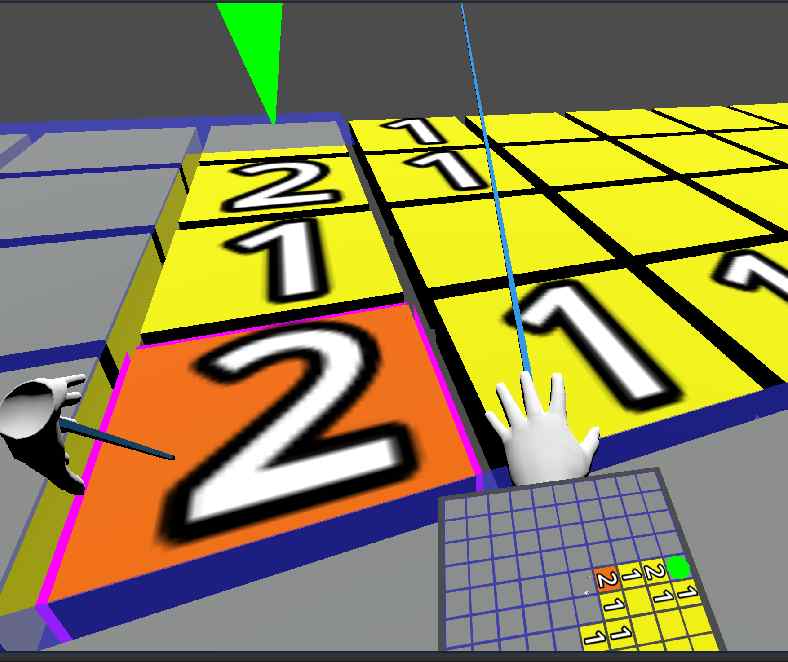
I attached a Node3D to my XROrigin3D and to that I added a SubViewport , Camera3D and a MeshInstance3D . Then I added a Sprite3D to my hand mesh.
With the tree built I set the Sprite3D to use the SubViewport , set the Camera3D to be Orthogonal, tweaked the Sprite3D to be single sided and a reasonable size/rotation etc.
Finally I used my existing Event Bus within a script attached to the XROrigin3D to listen to the game area size being set and set the Orthogonal Camera3D to have a size that means it can see the whole board.
One difficulty was that the new view could see itself and that was causing odd glitching. I set the Cull mask to only show Layer 1 and then moved the Sprite3D and raycast meshes to be on Layer 2. I like the effect that you can still see the actual hands in the view.
I have fixed it now, but the screenshot above shows the view attached to the left wrist upside down :)
The Node3D containing the Camera3D was moved to above the game area. Due to being Orthogonal the height does not matter, but it is easier for me to see it in the editor.
Making the Sprite3D single sided means the view is not visible unless you turn your wrist towards you, as if reading a watch.
I have been surviving on a 256GB SSD drive for a very very long time. But just recently I keep having to do emergency re/movals to keep everything ticking along. So I got myself a new 2TB.
Plugged it in, booted and
dd
'd one drive to the other block by block. Removed the old drive and was able to boot to the new one as if nothing had changed. If you know about
dd
you would know that the block by block copy means that the new drive has the capacity of the old one. This was expected all, I needed to do is boot a USB drive with GParted and resize the partition...
Oh, it sounded so easy, but ...
First boot of my USB drive with GParted got stuck on an initial copyright screen.
Messing around in the BIOS and I cannot disable UEFI secure boot overall, but I can disable it for the USB drive. Didn't help, what did, was forcing UEFI mode on USB. This got me to the GParted boot menu. None of the menu options got very far without a Kernel panic . Reading the details and it was because I had left my old Windows hard drive in the matching and GParted was trying to check it in a dirty state . Removed that drive and tried again... got Kernel panic . Something about the SQUASH FS being corrupt.
OK, so the USB drive install of GParted seems to be borked and I have no idea how old that version is. So I downloaded the latest version 1.7.0 and was just about to
dd
it onto the drive, when I thought I should use a dedicated tool for the job.
In my Bash history the only reference to Unetbootin was to remove it from the system. Strangely all the documentation still says you should be able to install it, but it is not available. Looked at the next most common USB boot drive writer Ventoy , nah not available either.
So I ended up just
dd
-ing it
dd if=/home/user/gparted-live-1.7.0-8-amd64.iso of=/dev/sdc bs=4M; sync
Booted first time no issues. Even recognised that the partition could be extended. 3-4 minutes later and one reboot and I finally have a 2TB drive with everything working as it should.
Except I haven't in any meaningful way.
If you have not heard of haveibeenpwned.com then you might be looking in the wrong places. The site comes up regularly in the press when there has been a data breach and people need to check if their email address is in it.
I pay for access due to the number of email aliases I have amassed over the years. And I am happy to support them.
Trying to use my notes from the Previous incident was a bit of a disaster. I had tried not include specific file names and this meant the commands were incomplete, not to mention the Json format returned from HIBP has changed.
So, here are my more complete notes from getting the latest data from the email aliases on my domain.
# download my breaches using my APIKEY
curl --header "hibp-api-key: HIBPAPIKEY" "https://haveibeenpwned.com/api/v3/breacheddomain/jumpstation.co.uk" -o /tmp/hibp

# create a map file to work with
jq '. | to_entries | map_values({key:.value} + { email: .key }) | map({key:.key[], email:.email})' /tmp/hibp > /tmp/hibp_map.json

# get all the breaches
curl "https://haveibeenpwned.com/api/v3/breaches" -o /tmp/breaches-2025-10-13.json

# join and sort the data
jq '[JOIN(INDEX(input.[]; .Name); .[]; .key) | add] | sort_by(.AddedDate,.email)' /tmp/hibp_map.json /tmp/breaches-2025-10-13.json > /tmp/hibp_joined_sorted.json

# get just this years breaches and only include the breach name(key), my email alias and the breach AddedDate
jq 'map(select(.AddedDate | startswith("2025") ) ) | map({key:.key, email:.email, addedDate:.AddedDate})' /tmp/hibp_joined_sorted.json
and after all that it turned out to be three very old addresses in the SynthientCredentialStuffingThreatData breach
For more information on how some of these jq commands work see Previous


email
root
flog archives
Disclaimer:
This page is by me for me, if you are not me then please be aware of the following

I am not responsible for anything that works or does not work including files and pages made available at www.jumpstation.co.uk
I am also not responsible for any information(or what you or others do with it) available at www.jumpstation.co.uk

In fact I'm not responsible for anything ever, so there!